Joyride: The Presentation Template for Creative Journeys
In a world where communication is visual and ideas need momentum, a great presentation isn't just about data—it’s about the journey. The Presentation Template - Joyride is designed to be that vehicle. It’s more than a set of slides; it’s a structured, adaptable starting point for anyone needing to convey passion, process, or purpose with clarity and style.
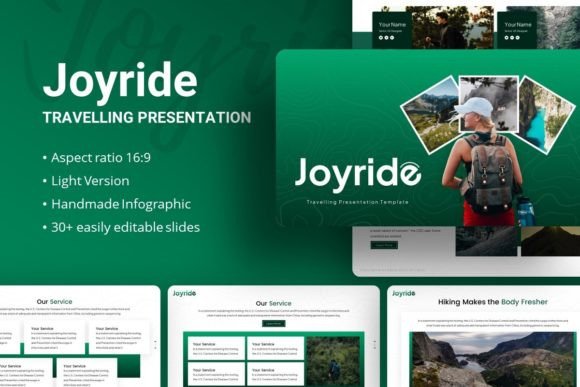
What makes Joyride interesting isn’t a single flashy feature, but its thoughtful composition. It provides 35 unique slides built on a foundation of master slides, ensuring consistency isn’t an afterthought but a built-in principle. The handcrafted infographics, pixel-perfect illustrations, and resizable graphics aren’t just decorative—they are functional elements meant to be edited. You can drag and drop your images into placeholders, swap colors, and rearrange components without breaking the design’s integrity. This balance of robust structure and open customization is its core utility.
Unlocking Creative Possibilities Across Fields
The template’s name, Joyride, hints at an experience—something engaging and dynamic. This ethos can be applied across a surprising spectrum of projects. For a creative agency, it becomes a portfolio narrative, moving from problem statement to creative solution seamlessly. A startup can use its clean infographics to build a pitch deck that balances ambition with credibility. An educator might adapt its sections to create a compelling lecture series, where visuals reinforce key concepts.
Consider the practical variations. Using the included Poppins and Plus Jakarta Sans fonts, a corporate user can establish a professional, modern tone, while a photographer might emphasize the minimalist layouts to let their imagery dominate. The template supports both density and simplicity. You could create a detailed company profile with all 35 slides, or extract just a handful—like the timeline, team, or statistics slides—for a shorter, impactful social media presentation.
Adaptation is Key: Matching Template to Audience
The true test of any template is how well it bends to different goals without snapping. Joyride’s master slide system is the technical answer, but the creative answer lies in how you interpret its pieces.
A freelancer crafting a personal portfolio might focus on the narrative slides. They could use the journey-themed graphics to literally map their career path, replacing placeholder text with stories of client collaborations and turning the project showcase slides into a visual diary. The audience here is potential clients or collaborators; clarity and personality are paramount.
Conversely, a marketer preparing a quarterly business review for internal stakeholders would pivot to data expression. The same infographic assets used for a creative process can be repurposed to visualize sales growth, market penetration, or campaign metrics. Here, the audience needs quick, authoritative comprehension. The template’s clean backdrop keeps complex information from becoming chaotic.
Practical Inspiration for Your Project
Let’s move from theory to application. Imagine you’re a blogger launching a new content series. You could use Joyride to create a promotional presentation not for a boardroom, but for your newsletter or website. The title slide introduces the series theme; subsequent slides break down upcoming topics, featured guests (using the team/profile layouts), and expected takeaways. The result is a professional-looking preview that generates interest.
Or, take a small business owner seeking a loan. The pitch deck requirements are specific: problem, solution, market, team, financials. Joyride’s sequence naturally accommodates this. The customizable illustrations allow you to create simple logos or process diagrams specific to your business—like a unique flowchart of your service delivery—making the pitch memorable beyond standard templates.
For those concerned with originality, remember the template includes vector icons and is compatible with resources from Unsplash, Pixabay, and Pexels. This means you can inject unique photography and iconography that aligns with your brand. Consistency is maintained by sticking to the template’s suggested font pairings and color palette derived from its graphics, while originality comes from your content choices and visual substitutions.
Keeping Results Clear and Effective
Adaptability must always serve clarity. When customizing Joyride, a useful recommendation is to start by defining your core message, then map it to the template’s slide sequence. Remove slides that don’t serve that message. Its 35-slide count is a buffet, not a mandate.
Use the handcrafted infographics as intended: to simplify. Don’t overcrowd them with text. Let a well-designed chart or process illustration carry the weight. The drag-and-drop picture placeholder system encourages you to use high-quality, relevant images that complement, not compete with, your text. The documentation file provided is your guide to doing this efficiently, ensuring you understand how to edit elements without frustration.
Finally, consider your output format. A presentation designed in Joyride might be presented live, shared as a PDF, or embedded on a website. The template’s visual cohesion ensures it remains effective across all these contexts. For digital sharing, lean on the template’s modern, web-friendly aesthetics; for live presentations, its structured layouts provide a confident pacing guide for the speaker.
The Presentation Template - Joyride ultimately offers a path. It provides the signposts and the vehicle, but the destination is defined by you. Whether your journey is about securing funding, showcasing art, teaching a skill, or building a brand, this template supports that voyage with a design that understands both order and creativity. It invites you to focus on your story, knowing the framework for telling it clearly is already in place.