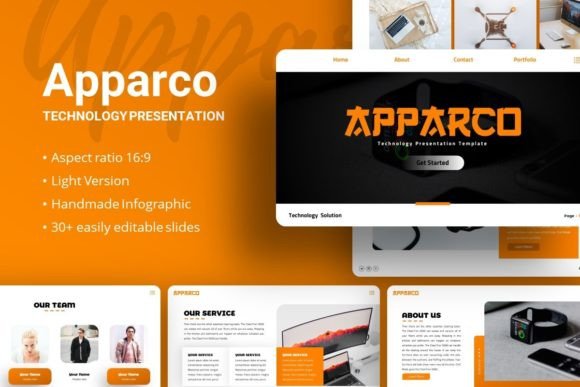
Apparco: A Versatile PowerPoint Template for Modern Presentations
In today's fast-paced world, whether you're pitching a startup idea, showcasing a photography portfolio, or presenting a corporate strategy, the quality of your slides matters. A polished, professional presentation can command attention, clarify complex ideas, and leave a lasting impression. But designing such slides from scratch demands significant time and design skill—resources many professionals simply don't have. This is where Presentation Template - Apparco comes into play.
What Exactly is the Apparco Presentation Template?
At its core, the Apparco Technology Presentation Template is a professionally designed, fully editable PowerPoint file. It provides a foundational structure and aesthetic framework, allowing you to create stunning presentations by focusing on your content, not on tedious design work. Think of it as a sophisticated blueprint; you bring your ideas, data, and images, and Apparco provides the clean, modern layout to present them effectively.
The template is built with versatility in mind. It isn't locked to a single niche. Instead, its design philosophy—clean lines, contemporary typography, and flexible layouts—makes it suitable for a wide array of contexts. From a creative agency's brand pitch to an educator's lecture deck, the underlying structure adapts to your message.
Key Features That Define Its Value
The appeal of Apparco lies in its combination of depth and ease of use. It offers 35 unique slides per template, giving you a comprehensive toolkit. You won't find yourself repeating the same slide layout; there are dedicated slides for team introductions, data infographics, portfolio showcases, and financial projections.
- Easy Customizable Contents: Every element, from text boxes to graphics, can be edited directly within PowerPoint. No specialized software is required.
- Handcrafted Infographics: Data visualization is crucial. The template includes custom-designed charts, graphs, and process flows that you can modify with your own numbers.
- Master Slide Foundation: Changes to fonts, colors, or background styles on the master slides propagate throughout the presentation, ensuring consistent branding.
- Resizable and Editable Graphics: All icons and illustrative elements are vector-based or pixel-perfect, meaning they can be scaled up or down without losing quality.
- Drag-and-Drop Picture Placeholders: Adding your photography or logos is a simple drag-and-drop operation, speeding up the assembly process dramatically.
The Practical Problems Apparco Helps Solve
For many users, the primary challenge is time. A freelancer preparing a client pitch deck needs to invest hours in research and strategy—design time is a luxury. Apparco eliminates that bottleneck. Similarly, a small business owner with no formal design training can produce slides that look as professional as those from a large agency, enhancing credibility.
Another common issue is visual cohesion. Amateur presentations often suffer from inconsistent fonts, mismatched colors, and awkward image placement. Because Apparco is based on a unified master slide system, visual harmony is maintained automatically. This is especially valuable for projects like a personal portfolio or a company profile, where a cohesive aesthetic directly reinforces your professional identity.
Finally, the template addresses the problem of engagement. Static slides filled with dense text fail to capture attention. The included infographics and thoughtful layout designs help you break down information into digestible, visually appealing segments, making your presentation more effective for your audience.
Real-World Use Cases and Applications
Let's look at how different individuals might apply the Apparco template in their work.
An entrepreneur crafting a startup pitch deck would use the slides dedicated to problem statements, solution summaries, market analysis graphs, and team bios. The modern, tech-friendly aesthetic implicitly supports a narrative of innovation.
A photographer or artist using it for a personal portfolio would benefit immensely from the large image placeholder slides. They can seamlessly drop in their best work, with the template providing elegant framing and caption spaces, turning a simple slideshow into a curated exhibition.
Marketing professionals in a creative agency can adapt the template for client presentations. The corporate and business-oriented slides allow them to present campaign analytics, timelines, and branding concepts with a visual flair that mirrors their creative service.
Even educators and trainers can find value. The clear, structured layouts are excellent for breaking down instructional material or presenting research findings at conferences, where clarity is paramount.
Important Considerations Before Using Apparco
While the template is designed for broad usability, a few points are worth noting to ensure it meets your expectations. First, understand that the demo images showcasing the template—often from sources like Unsplash, Pixabay, and Pexels—are for preview purposes only. They are not included in the download files. You will need to supply your own photographs, logos, and screenshots. This, however, is a benefit, as it forces you to personalize the presentation fully.
The template files included are a PowerPoint (.PPTX) file and a documentation file. This means you need access to Microsoft PowerPoint or a compatible presentation software that can open .PPTX files to use it. The documentation file is a helpful guide, especially for beginners, explaining how to leverage the master slides and customize elements.
Fonts used are Montserrat and Titillium Web. These are popular, clean fonts often available freely or within PowerPoint. If you wish to maintain exact typographic consistency, you may need to ensure these fonts are installed on your system, but PowerPoint will typically manage substitutions gracefully.
Finally, recognize that a template is a starting point. Its greatest power is its customizability. To truly make it your own, invest time in populating it with your specific content, tweaking colors to match your brand, and selecting the slide variants that best tell your story. The 35 slides offer choice, but the most effective presentation will use a curated selection, not necessarily every single one.
Why Apparco Stands Out for Beginners and Professionals
For the beginner, its straightforward, drag-and-drop functionality and clear documentation lower the barrier to creating a good presentation. There's no need to learn complex design software. For the seasoned professional, the time savings and the professional baseline quality are the key draws. It removes the repetitive groundwork, allowing them to focus on refining the message and strategy.
Its inherent flexibility is its defining characteristic. By not being overly themed for one industry, it becomes a reliable tool in your digital toolkit, ready to be deployed for the next project, whether it's a business report, a webinar, or a personal accomplishment showcase. The Apparco Presentation Template understands that your content is unique, and it provides the adaptable stage upon which that content can shine.